WooCommerce Bookings and Product Add-Ons Bundle
Create the ultimate bookings site in WooCommerce
Accept bookings and offer optional extras to users



A complete suite of tools for your bookings site
All the power of our Bookings for WooCommerce plugin
- Create bookable products in WooCommerce
- Automatically calculate the cost of the booking
- Set available quantity for each product
- Sync with ical including Airbnb, Booking.com, VRBO

Plus the power of Product Add-Ons Ultimate
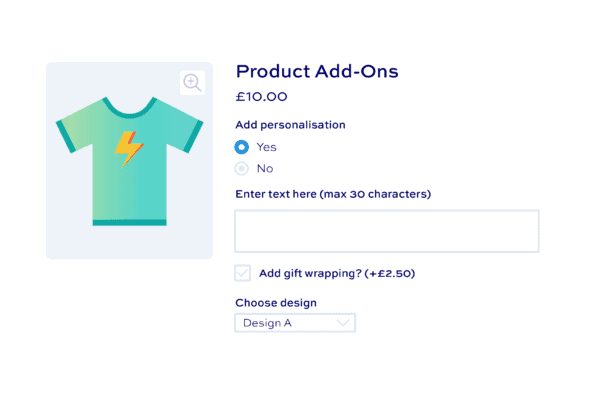
- Add extra options to WooCommerce products
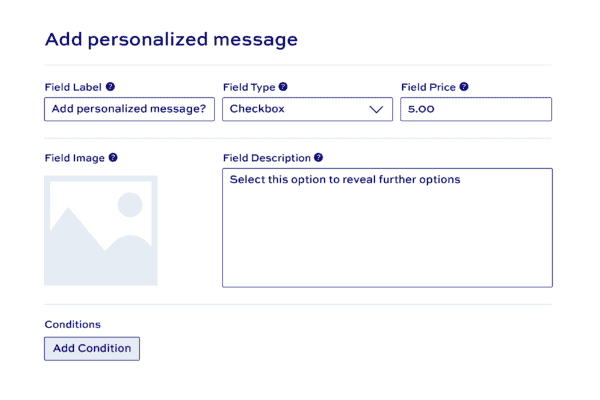
- Advanced features like conditional logic
- Add extra custom fields globally or per product
- Over 20 different extra field types
Work together seamlessly
- Plugins are fully compatible
- Use the Pro version for extra features like child products
- Highly customizable and extendable
- Perfect for coders and non-coders alike
What customers say about our WooCommerce Bookings and Product Add-Ons Bundle plugin
I have absolutely no web experience however have found installing the plugins super simple. And your support is amazing!

Your customer support team is absolutely superb. I have worked with Collins and Clint, and they have been helpful, patient, and incredibly easy to work with.

WooCommerce Bookings and Product Add-Ons Bundle plugin features
The perfect solution for your bookings site




Set different booking units
Offer bookable products by day, overnight, or weekly
Define time slots
Create hourly or other time-based slots with the Bookings and Add-Ons Bundle
Maximum bookings per unit
Set a limit on the number of bookings per booking unit
Set minimum/maximum durations
Define a minimum and/or maximum duration for each booking
Choose a start day
Optionally define a day of the week for each booking to start
Postpone booking starts
Avoid last minute bookings so you're not taken by surprise
Buffer periods
Set a period after rentals to give you preparation time between bookings
Single day bookings
Display a single calendar for one-day events
Multiple day bookings
Specify fixed durations - or let users choose start and end dates
Daily / overnight / weekly units
Define bookings per day, overnights, or weekly
Display availability to customers
Show when dates are fully or partly booked, or completely booked out
Show prices per unit
Display prices on the calendar for user's convenience
Filter all products by date
Add calendar to shop page to allow users to filter all products by their required dates
Single global calendar
View global availability calendar for bookings from one place
Block out days and dates
Ensure products and services are unavailable for certain dates
Automatic email notifications
Remind users when they've got a booking coming up
Sync with third party platforms
Sync your bookings with listings on Airbnb and Booking.com
Differential price rates
Set price rules for high season, low season, high demand, etc
Discount booking price
Change the price of the booking based on duration
Block dates
Set dates to unavailable for each bookable product
User-role pricing for bookings
Set different prices for different user roles for your bookings
Customize price label text
Define your own custom price labels, e.g. 'From $50 per night'

20+ product add-ons field types
Add multiple WooCommerce custom fields to your product page


Calculation fields
Calculate values using formulas, the values of other fields, and global variables. Use the results to set the product price or just as simple values
Checkbox fields
Offer extra options as single checkboxes - users can either select them or not
Checkbox groups
Add multiple checkboxes as a single group. Set minimum and maximum number of checkboxes that can be selected within a single group
Color picker fields
Color pickers allow customers to select a color value from a graphical color chart
Date picker fields
Date pickers allow customers to select a date from a calendar. You can specify minimum or maximum dates and exclude certain days of the week
Hidden fields
Hide fields on the product page so that the user cannot see them
Information fields
Display additional text and/or images without requiring user input: ideal for meta data, additional technical information, nutritional values, etc.
Name Your Price fields
Allow customers to set their own custom prices - a flexible way to add customer-defined pricing
Number fields
Allow users to enter numerical values. You can set minimum and maximum values and define step values (e.g. decimals)
Products fields
With Products fields, you can use standard WooCommerce products as custom options
Product categories fields
Product categories extend Products fields, allowing you to include all products with a product category as custom options
Radio button options
Radio buttons allow users to select one option from a group of options
Select (dropdown) fields
Allow users to select one option from a dropdown list
Select box fields
Present options in a powered-up select field, with text and images
Swatches - color
Present color options to users graphically
Swatches - image
Allow users to choose one or more options displayed as image thumbnails
Swatches - text (buttons)
Display text as graphical buttons - users can choose one or more option
Text fields
Allow users to enter a single line of text. Charge per character, set minimum / maximum characters limits, and much more
Textarea fields
Allow users to enter multiple lines of text. Charge per character, set minimum / maximum characters limits, and much more
Upload fields
Allow users to drag and drop images and files. Allow multiple uploads
Text preview add-on
Use the Text Preview extension to allow the user to preview their custom text on the product image
Image preview add-on
Use the Image Preview extension to allow the user to preview their uploaded images on the product image
Pricing options
Product add-ons can be free, add cost to the product, or subtract cost from the product
Quantity-based pricing
Assign a price to a product add-on field or option - multiply it by the number of items the user adds to the cart
Percentage pricing
Choose to enter add-on prices as values or as a percentage of the base product price
Flat rate pricing
Apply flat-rate (fixed) prices to add-on fields so that the cost is only charged once, irrespective of how many items the user purchases
Customer-defined pricing
Allow customers to define their own prices with the Name Your Price add-ons field
Show or hide prices
Choose whether to show or hide field and option prices to the user by location, e.g. on product page, cart and checkout, order pages
Update main WooCommerce product price
Update the main WooCommerce product price dynamically based on the add-on fields the user selects
Product add-on price totals
Show or hide totals on the product page, e.g the base product price, the cost of the add-ons, the overall combined price
Pricing summary panel
Choose to dynamically update a separate information panel with details of the user's custom fields and prices as they are selected
Set product price with calculations
Use the 'Calculations' add-on field type to set field and product price through math formulas
Set add-on prices with formulas
Update add-on field and option prices directly using formulas
Multicurrency support
WooCommerce Product Add-Ons Ultimate supports WooCommerce Multicurrency, Aelia Currency Switch, and CURCY
Set product add-ons to required
Ensure that users enter a value in certain fields by setting them as mandatory
Default product options
Define default values for fields
Conditional logic
Show or hide add-ons or groups depending on the value of other fields
Repeater fields
Fields can repeat by clicking a button or based upon the selected quantity
Progress bar
Add an optional progress bar to graphically show the user how many fields they have completed and how many remain
Tooltips
Create helpful tooltips for each product add-on, allowing users to understand what each field is for
Populate fields through URL
Create custom URL params to pre-populate custom field values
Edit fields from cart
Allow users to return to their product from the cart, change field values, and update the cart
On-page validation
Enable 'live' validation so that users can see any issues before adding the product to the cart
Disable add to cart button
Disable the add to cart button until all required fields have been completed
Clear all button
Enable a button for the user to clear all custom field values they've entered on the product page
Developer-friendly
Easily extend Product Add-Ons Ultimate using multiple hooks and filters
Match theme styles
Product Add-Ons Ultimate will automatically match your theme for seamless integration into your site
Group layout options
Display groups of fields as a single list - or in accordion, tabs, steps, or lightbox layouts
Field layouts
Choose how to display fields within each group, e.g. single column, two column, three column
Customize and preview styles
Use the default WordPress Customiser to update colors, font sizes, spacing, etc - and preview in real time



Show/hide fields or groups
Set conditions based on the value of other fields, or on product quantity, cost or attributes
Variation specific fields
Display fields only when certain product variations are selected
User role and authentication
Show or hide fields depending on the user's log-in status or user role
Create complex formulas
Calculate values and prices based on the value of other add-on fields or options, product price, user inputs, or product quantity
Use customer inputs
Set product prices dynamically using values from other add-ons fields, e.g. use customer inputs for height and length to calculate area
Dynamic product dimensions
Update product dimensions dynamically - weight, width, height, length - through calculations based on user inputs
Use ACF field values
The Advanced Calculations extension allows you to include values from Advanced Custom Fields in your calculations
Get values from lookup tables
With the Advanced Calculations extension, you can read values from lookup tables based on user inputs
Track product add-ons inventory
'Child' products are products in their own right - so you can track their inventory. When they run out, they're no longer available
Product add-ons SKUs
Child products can also have their own SKUs so can be included in pick lists etc
Weight and dimensions
Child products can have their own dimensions - ensuring shipping costs are always accurate, even for product options
Separate tax classes for product add-ons
Set different tax classes for options and products
Product categories add-on field
Use 'Product categories' add-ons to automatically use all products within specified categories as options in your main product
Create composite products
Composite products are made of multiple components. Each component can be a separate product, with inventory, SKU, weight, price, etc
Create bundled products
Bundled products are multiple products sold together. Easily create bundled products with the Products add-on field
Organize fields in groups
Each field belongs to a group, making it easier to manage your product add-ons
Individual product add-ons
Add fields and groups to individual products, if you wish
Global product add-ons
Create product options globally and assign them to multiple products, to specific product categories, or to all products
Titles and descriptions
Add titles, images and descriptions for each add-on option and group
Duplicate groups and fields
Easily duplicate add-on fields or entire groups within the same product
Import / export fields and groups
Easily copy groups and fields to other products to make things easy. Import field options from CSV - easier to update and manage
Pricing
All purchases are covered by a 14 day money back guarantee.
All prices are in US Dollars.
Yearly licenses renew annually - cancel anytime
Lifetime licenses are a one-time payment
Single
$99 + VAT *
Use on a single siteUse this plugin on one production site
Renews annuallyThis plugin will automatically renew every year. If you cancel it, you can continue to use the plugin but will not receive support or updates
14 day money back guaranteeIf the plugin isn't what you want, just drop us a line within 14 days for a full refund
Pro
$169 + VAT *
Use on up to 5 sitesUse this plugin on up to 5 sites
Renews annuallyThis plugin will automatically renew every year. If you cancel it, you can continue to use the plugin but will not receive support or updates
14 day money back guaranteeIf the plugin isn't what you want, just drop us a line within 14 days for a full refund
Agency
$599 + VAT *
Use on up to 25 sitesUse this plugin on up to 25 sites
Renews annuallyThis plugin will automatically renew every year. If you cancel it, you can continue to use the plugin but will not receive support or updates
14 day money back guaranteeIf the plugin isn't what you want, just drop us a line within 14 days for a full refund
Single
$269 + VAT *
Use on a single siteUse this plugin on one production site
One-time paymentThis is a single one-time charge. You'll receive support and updates for the lifetime of the product
14 day money back guaranteeIf the plugin isn't what you want, just drop us a line within 14 days for a full refund
Pro
$379 + VAT *
Use on up to 5 sitesUse this plugin on up to 5 sites
One-time paymentThis is a single one-time charge. You'll receive support and updates for the lifetime of the product
14 day money back guaranteeIf the plugin isn't what you want, just drop us a line within 14 days for a full refund
Agency
$1499 + VAT *
Use on up to 25 sitesUse this plugin on up to 25 sites
One-time paymentThis is a single one-time charge. You'll receive support and updates for the lifetime of the product
14 day money back guaranteeIf the plugin isn't what you want, just drop us a line within 14 days for a full refund

A full refund if you're not happy
I built this plugin myself and my team and I are available to support you personally. We want you to be 100% satisfied with your purchase so if, for any reason, this plugin doesn't meet your expectations over the next 14 days, let us know and we'll give you a full refund.
Why buy the WooCommerce Bookings and Product Add-Ons Bundle plugin?
Combine two of our most powerful and popular plugins. Bookings for WooCommerce allows you to accept date-based bookings for rentals, equipment or services. Add-Ons Ultimate allow you to add extra options to your booking products. The Pro version allows you to create resources and time-based bookings. Get the bundle today and save over 25% on the price of these two plugins.
FAQs
Changelog for WooCommerce Bookings and Product Add-Ons Bundle
Please check the plugins within the bundle for individual changelogs
Pre-Sales and Licensing
Will this plugin work with my theme?
All my plugins are independent of the theme being used so there shouldn't be any problems. If you do run into any issues, just let us know and we will take a look.
Is there a demo or free trial?
For WooCommerce Product Add-Ons Ultimate, we have a fully functioning admin demo plus a front-end demo with multiple examples of products.
Additionally, all our products are backed by a 14 money back guarantee so if the plugin isn’t what you wanted, we will issue you with a refund.
If you'd like to test Product Add-Ons Ultimate, you can create a free demo site by clicking this link. The site comes with several products already populated with add-on fields to let you get an immediate feel for the plugin.
To view the front-end demo site, just click this link.
If you decide to go ahead and purchase, you'll still have a 14 day money back guarantee. This allows you to spend time testing the plugin on your own environment, with your own theme and with your own plugins. It’s the best way to help you be sure that the plugin is what you want.
You can also upgrade your license at any time – so, if you wish, you can purchase a Yearly license initially then upgrade to the Lifetime license within the first year and just pay the difference.
If you have any questions during your 14 day refund period, you can raise a support ticket and we will get straight back to you.
Do you offer refunds?
Yes, there’s a 14 day money back guarantee. The purpose of this guarantee is to give you plenty of time to assess the plugin to see if it will meet your needs.
During the 14 days, if you’ve got any questions about the plugin and what you are hoping to achieve with it, just raise a support ticket and we’ll get back to you.
You can find out how to register your refund request here.
How long is the license valid for?
Yearly licenses are valid for a year. During that time you are entitled to receive free updates and support. After 12 months, yearly licenses will automatically renew. You can cancel at any time.
Lifetime licenses are a single, one-off payment. Lifetime licenses do not expire and you are entitled to receive all future updates for the plugin.
You can purchase a Yearly license then upgrade to Lifetime if you wish. Upgrade within the first year to just pay the difference.
Can I upgrade my license and just pay the difference?
Yes, you can upgrade your license any time in the first year and just pay the difference. So if you want to upgrade from Single to Pro or if you want to upgrade from Yearly to Lifetime, you can do so and only pay the difference in price.
Also, if you wish, you upgrade from one product to a bundle that contains that product and also only pay the difference. So you can buy one or more products then upgrade to the All Access Bundle and only pay the difference in price.
What are the differences between the license options?
All versions of the license - Single, Pro or Agency - contain the same features. There are no additional features in certain licenses.
The only difference is how many sites you can use the plugin on: Single allows you to use the plugin on one site; Pro allows you to use the plugin on up to 5 sites; Agency allows you to use the plugin on up to 25 sites.
If you buy a Yearly license, you are buying a subscription product that will renew every 12 months. You can cancel at any time. If you buy a Lifetime license, this is a single one-time payment with no renewals.
You can try out a Single license first then upgrade to Pro or Agency at any time. Here’s how to upgrade your license. If you upgrade within 12 months of purchase, you'll only pay the difference between the two licenses.
Does the plugin integrate with […]?
Bookings for WooCommerce integrates with a wide number of other plugins to ensure maximum functionality and flexibility. Here are some of the most important and popular integrations it works with out of the box:
WooCommerce Product Add-Ons Ultimate
Bookings for WooCommerce integrates with WooCommerce Product Add Ons Ultimate to allow you to include additional chargeable options in your bookings. Possible options might include:
- Cleaning fees
- Linen fees
- Transfer costs
- Bicycle hire
- Bed and breakfast options
- Half board or full board options
- Optional insurance charges
- Facilities hire
- Extra towels
- Surcharges for extra guests
- Additional beds or bedding
- Welcome packs
- Shopping hampers
Each additional option can be charged as a one-off fee or per bookable unit, e.g. per night, per week.
WooCommerce Deposits and Part Payments
Bookings also integrates with Deposits and Part Payments, allowing you to take deposits on your date-based bookings. There's a tutorial here on accepting deposits for WooCommerce bookings.
Is Bookings for WooCommerce compatible with any multi-currency plugins?
Yes, Bookings for WooCommerce is compatible with Aelia Currency Switcher.
Is Product Add-Ons Ultimate compatible with CSV importers?
You can continue to import products via a CSV or XML importer even if you are using WooCommerce Product Add-Ons Ultimate. However, it's not currently possible to use a standard CSV import/export plugin to import the product add-on fields themselves.
However, we do have a specialist import/export tool in beta that will allow you to export your add-on groups and fields to a CSV file, then import them to another site. Product level and global fields can be exported and the tool will allow you to map the fields to new products in the import site.
Please note that some of the field data is exported as serialised arrays - meaning that it's not easy to edit the fields in a spreadsheet. If you'd like to try the import/export tool, please contact us by raising an enquiry on the Support page.
It is also possible to import field options through CSV file using the Advanced Calculations extension. This allows you to manage fields with large numbers of options - e.g. dropdown lists - so that you can just upload your CSV file and the field options will automatically be updated on the front end.
Alternatives to importing and exporting
One of the main reasons for wanting to import and export fields is to make editing a large number of fields easier. Product Add-Ons Ultimate allows you to create global add-ons, which can be applied to all products, multiple products, or all products within specified categories. So instead of creating the same field over and over for each product, you just create the field once and apply it to multiple products. Global add-ons are persistent - they won't get wiped when you add or import new products.
Using global add-ons makes it easier to edit your add-on fields - even when the add-on fields apply to multiple products.
Features
What types of WooCommerce bookings does the plugin support?
Bookings for WooCommerce supports daily, overnight and weekly date-based bookings - making it ideal for property rentals, equipment hire, service appointments and facility reservations. If your business takes any kind of calendar-based booking, the plugin is designed to handle it.
What are the different types of extra product options?
Our WooCommerce product add-ons plugin includes over 20 different types of extra product options. The custom add-on fields that you can add to your products include:
Text input fields
These are extra product options where the user can enter free text.
- Text fields allow users to enter text of their choice - ideal for engravings, personal messages, etc
- Textarea fields allow users to enter longer format text
User choice fields
Custom product fields where the user can choose from one or more options.
- Checkboxes allow users to select simple addon options
- Checkbox groups allow users to select one or more options from a group of checkboxes. You can specify a minimum and maximum number of checkboxes that must be selected by the customer
- Radio buttons allow users to select one option from a set of options
- Select fields (dropdown lists) allow users to select one option from a list of possible options
- Image swatches are clickable images for the user to select one or more options
- Text swatches (buttons) allow users to make selections from clickable text labels
Upload fields
- Upload fields allow users to upload images and files (including PDFs) to a modern drag and drop interface directly on the product page
Number input fields
These are extra product options which allow the user to enter or choose numeric values.
- Name Your Price fields allow customers to set custom prices
- Number fields allow users to enter numbers
- Number range slider fields allow the user to drag a slider along a range to enter a numerical value
Calculation fields
- Calculation fields allow you to set values with formulas that can use the values of other fields, global variables, product quantity and prices. Use the results to set the product parameters like price or weight or just as simple values
Child product fields
Child products are a unique type of product add-on. They allow you to use other products on your site as custom options.
- Products fields allow you to include specific products as add-ons within your ‘parent’ product - perfect for when you want to track inventory or SKUs of your extra fields or if they should be part of shipping calculations
- Product categories fields allow you to Insert all products within specified categories as child products quickly and easily
Date and time fields
You can add custom product options for users to select dates:
- Calendar List fields allow users to pick dates from a limited range - great for delivery dates
- Date Pickers allow customers to select a date - specify minimum / maximum dates
Color choices
- Color Pickers allow customers to select a color value from a color chart
- Color swatches allow users to choose a color from a set of different colored buttons
Information
- Information fields are custom product add-ons that display additional information - ideal for meta data, additional technical information, nutritional values, etc.
Can customers make WooCommerce bookings directly from my store?
Yes. Customers select their dates using the booking calendar on the product page, see the total cost calculated automatically, then complete their booking through the standard WooCommerce checkout - no redirects, no third-party booking platforms required.
Can I add multiple custom options to the same field?
Yes, with our WooCommerce Product Add-Ons Ultimate plugin you can add an unlimited number of extra product options to any product.
You can configure the fields per product or you can create 'global' fields which allow you to assign fields to multiple products from a single location.
How does automatic pricing work for WooCommerce bookings?
The booking plugin calculates the total cost based on the number of days, nights or weeks selected. You can also apply custom pricing rules for weekends, peak seasons or longer stays, along with booking discounts - all managed directly from your WooCommerce admin.
Can I add the same custom options to multiple fields?
Yes. Product Add-Ons Ultimate allows you to create extra product options 'globally'. You organize your options into groups and groups can be assigned to all products, all products in specific categories, or specific products.
So if all your products in a certain category require the same custom options, you can create them globally and assign them to that category. That means you can create and edit options from a single location and apply all changes across multiple products.
How does the Bookings for WooCommerce plugin prevent double-bookings?
You set the available quantity for each bookable product per day, night or week. Once that quantity is reached, those dates are automatically blocked in the booking calendar. You can also add buffer periods between bookings to allow for turnaround time.
Is it possible to charge extra for product add-on fields?
Yes. Our extra product options plugin has a number of simple and advanced pricing features:
- Each field can be assigned a price that will be added to the overall product price if the field is selected - so if the customer enters some text in a text field that has a price associated with it, that price will be added to the product price
- Custom fields with options - like select fields or radio buttons - can have prices associated with each option. So if the customer chooses 'Option A' then the price for that option will be added to the product price
- Quantity-based pricing - this means that the price of the add-on field will be multiplied by the quantity of product selected by the customer
- Flat fee (or fixed rate) - this means that the price of the add-on field will only be added once to the product price regardless of how many items the customer has selected
- Add or subtract costs - you can positive or negative values for field prices
- Percentage pricing - choose to increase or decrease price as a percentage of the product's base price
- Price by file upload - charge customers to upload one or more files; or charge them per file
- Calculate prices through formula - set pricing according to formulas based on user input
- Charge by character count - see a price per character for text fields
- Customer-defined pricing - allow customers to set their own prices or leave a tip
- Role-based pricing for add-on fields - set different prices for each add-on field for different user roles
You can choose whether to display prices for each add-on field or hide them from the customer. A summary of all selected options and their prices can be displayed above the add to cart button.
Tax will be added in line with your store settings.
Can you specify what day of the week bookings should start?
Yes, if you want to ensure that your bookings only start on a certain day of the week, you can specify this.
Can I accept time-based appointment bookings?
Yes, with the Bookings and Product Add-Ons Bundle. Bookings for WooCommerce handles date-based bookings natively, but when combined with Product Add-Ons Ultimate, you can extend this to offer hourly or other time-based appointment slots - making it ideal for yoga classes, salon appointments, tours, equipment hire by the hour and similar services.
Customers select their date from the booking calendar, then choose a time slot from the options you've configured. Availability updates automatically when a slot is booked, so overkbooking is prevented across all sessions. You can run multiple time slots per day, set capacity per slot and charge different prices for specific sessions.
The bundle gives you everything you need to accept WooCommerce appointment bookings in a single purchase - no additional third-party plugins required.
Does the plugin allow for a booking to start on the same day the previous booking ends?
Yes, you can decide whether to allow the next booking to start on the same day that the previous booking ends. Or you can require bookings to start one or more days after the previous booking.
Can I add extra services or upsells to bookings?
Yes, you can add extra options to your booking products using the Product Add-Ons Ultimate plugin:, available as part of the Bookings and Product Add-Ons Bundle.
You can offer optional or required extras - e.g. insurance, additional guests, equipment, welcome packs or board options. Each extra can be charged as a one-off fee or per bookable unit, such as per night.
Can I take deposits for bookings rather than full payment upfront?
Yes. By integrating with the WooCommerce Deposits and Part Payments plugin, you can collect a deposit at the time of booking and take the remaining balance later - particularly useful for high-value rental bookings or reservations made well in advance.
Can I use conditional logic on add-on fields and options?
The Product Add-Ons Ultimate plugin allows you to hide or show custom product options conditionally. You can set conditions according to:
- The value of other fields
- Attributes
- Product quantity
- Product cost
- Log-in status
- User role
You can also apply conditional logic to groups - so you can hide or show multiple add-on fields with a single condition on their parent group.
Variation-specific add-ons
The plugin also has a unique feature that allows you to show or hide fields when specific variations are selected by the customer. Or you can just set a condition on an entire attribute - so if the customer selects any 'Red' item, you can display a certain set of fields.
Conditional logic for fields options
The plugin also supports conditions for swatch options - so you can hide or disable options in one swatch field unless options in another swatch field are selected.
Chained dependencies
Chained dependencies just means that you can make a series of fields dependent on each other. So if Field A is selected, then Field B will be displayed; if Field B is selected, then Field C will be displayed.
Can I restrict the number of bookings per slot?
Yes, you can set availability for each product per day / night / week so you never overbook your products.
If you're using the Bookings and Add-Ons Bundle, you can also create time-based slots (e.g. hourly) and restrict availability for those.
How do I manage WooCommerce bookings from the admin?
YAll bookings are listed in your WooCommerce admin. A back-end booking calendar lets you view availability per product, while a global calendar gives you a single overview of availability across all bookable products - making it easy to stay on top of your schedule.
Does the plugin sync with Airbnb, Booking.com, VRBO, etc?
You can sync your booking calendar with any third party service that uses the ical format, e.g. Airbnb, Booking.com, VRBO. You can even sync between two WordPress sites if you wish.
Can I allow customers to upload images and files from the product page?
Yes. The WooCommerce Product Add-Ons Ultimate plugin allows to add file upload fields to your product pages so your customers can upload images and other file types, including PDFs.
By default, customers are able to upload .gif, .jpeg and .png files and you can specify any other file types by simply picking them from a list. You can also control the maximum file size permitted for uploads.
Uploaded files are listed as part of the order and you can download them direct from the order page in a zip file. You can also rename uploaded files with product ID, field ID, the time and date, and several other parameters.
Is it possible to upload multiple files?
Yes, you can allow the user to upload multiple files to the same field - or you can add multiple upload fields to the same product. If you allow multiple files to the same field, you can set a maximum on the number of files permitted.
Is it possible to charge for uploading files?
Yes, you can assign a price to the upload field so that the user will get charged for uploading a file. Or you can set an option to charge per file.
Can customers upload PDF files?
Yes, you can enable the option to allow PDF files to be uploaded. Using the Advanced Uploads extension, you can also count the number of pages in an uploaded PDF (and charge accordingly, if you wish).
Can customers edit their uploaded images?
If you have the Advanced Uploads extension installed, you can allow users to crop and rotate their uploaded images. You can also specify additional parameters like minimum and maximum width and height, image quality, aspect ratio and so on.
Can users preview their uploaded images?
If you have the Image Preview extension installed, customers can upload images and preview them as part of the main product image.
How can I manage uploaded files?
Files are uploaded to and stored on your server. In order to ensure that your server doesn't get full with uploaded files, you can manage and delete them. Options included deleting all files from completed orders or deleting all files uploaded before a certain date.
It's also easy to manage uploaded files by deleting them from your server when you no longer require them.
Can I offload uploaded files to third-party cloud storage?
Yes, Add-Ons Ultimate allows you to offload files uploaded through front-end upload fields to Amazon S3, Dropbox, Google Drive, etc, and save space on your own server.
Can I use other products as custom options?
Yes. 'Child products' is one of the most innovative features of Product Add-Ons Ultimate. You can add other products from your store as custom options - either as upsells or as components of a single product. So if you are selling clothing, you can offer accessories on the same product page as additional upsell options. Or you could offer mix and match products, like gift hampers, where users select a certain number of items that are products from your store and add them to their cart from one product page.
Using other products as options allows you track inventory for product options, assign SKUs to product options, even apply different tax classes to custom options from the main product tax class. You can also easily assign dimensions like weight and size to your product options which can be crucial when calculating shipping costs.
You can add child products individually or you can assign an entire category of product as options.
You can choose whether to allow your child products to be purchased separately on your site.
Is it possible to manage stock for custom product options?
As a general rule, extra product options do not have stock/inventory. However, if you need to track the stock level of some or all custom options, you can use the 'Products' field. This allows you to use other products on your site as options - meaning you can update their inventory, manage SKUs, or even apply different tax classes for options.
Can I set default values for product options?
Yes, you can set default values for product options. So for example, you can provide default text for a text field or pre-select an option in a select (dropdown) field.
Our products are featured on