WooCommerce Order Bump - Plugin
Increase sales and maximize revenue with the WooCommerce Order Bump plugin
Add modal pop ups and discounts to increase AOV and incentivize your customers to buy more
From $69.00





Increase your average order value with WooCommerce Order Bump
Sell more products
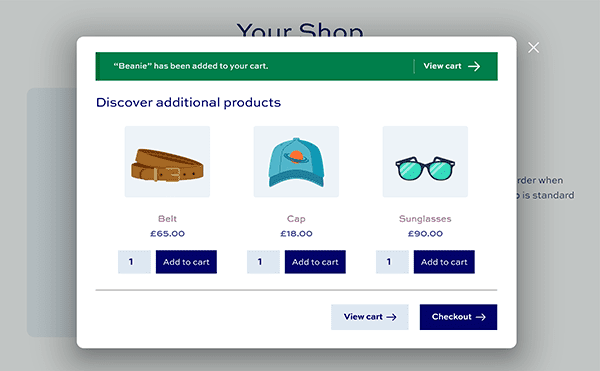
- Display modal pop-up automatically to encourage users to buy more
- Add to product, cart or checkout page
- Choice of layout and positions
- Offer discounts on products
World class support and documentation
- Extensive knowledge base with step by step instructions
- We respond to all support requests within 24 hours
- Hooks and filters for developers
Easy to install and set up
- Perfect for non-coders, developers and clients
- Simple form interface
- Save weeks of development time
WooCommerce Order Bump plugin customer reviews
See more reviews View us on Trustpilot
WooCommerce Order Bump plugin features
The best plugin for encouraging customers to purchase additional products

Configurable modal pop-up for upsells
A customizable pop-up window prompts users to add extra products to their cart at key times

Multiple display locations
The pop-up can appear on the product, cart or checkout pages

Create multiple bump offers
Build multiple unique bumps and assign them to different products or categories

Flexible product selection
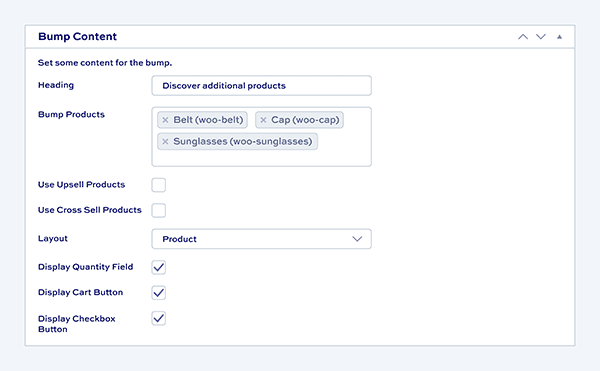
Choose which products to feature in the bump manually or automatically

Increase average order value
Encourage customers to add more items, boosting overall order size

Quick add-to-cart functionality
Users can easily add additional products to their cart without interrupting the checkout process

Trigger specific products or categories
Define whether all products, specific products, or entire categories trigger an order bump

Layout customization
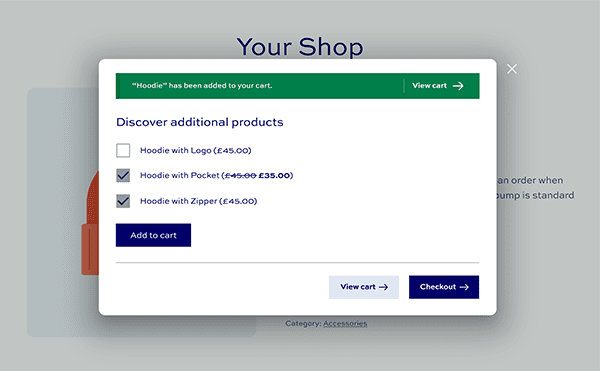
Select between two layouts: standard product archive or checkbox style

Offer discounted prices
Provide special discounts on products featured in the order bump to increase conversion rates
Pricing
All purchases are covered by a 14 day money back guarantee.
All prices are in US Dollars.
Yearly licenses renew annually - cancel anytime
Lifetime licenses are a one-time payment
Single
$69 + VAT *
Use on a single siteUse this plugin on one production site
Renews annuallyThis plugin will automatically renew every year. If you cancel it, you can continue to use the plugin but will not receive support or updates
14 day money back guaranteeIf the plugin isn't what you want, just drop us a line within 14 days for a full refund
Pro
$99 + VAT *
Use on up to 5 sitesUse this plugin on up to 5 sites
Renews annuallyThis plugin will automatically renew every year. If you cancel it, you can continue to use the plugin but will not receive support or updates
14 day money back guaranteeIf the plugin isn't what you want, just drop us a line within 14 days for a full refund
Free set-upDrop us an email after your purchase with the details of a product you'd like to set up and we'll do it for you - free of charge
Agency
$349 + VAT *
Use on up to 25 sitesUse this plugin on up to 25 sites
Renews annuallyThis plugin will automatically renew every year. If you cancel it, you can continue to use the plugin but will not receive support or updates
14 day money back guaranteeIf the plugin isn't what you want, just drop us a line within 14 days for a full refund
Free set-upDrop us an email after your purchase with the details of a product you'd like to set up and we'll do it for you - free of charge
Single
$189 + VAT *
Use on a single siteUse this plugin on one production site
One-time paymentThis is a single one-time charge. You'll receive support and updates for the lifetime of the product
14 day money back guaranteeIf the plugin isn't what you want, just drop us a line within 14 days for a full refund
Pro
$279 + VAT *
Use on up to 5 sitesUse this plugin on up to 5 sites
One-time paymentThis is a single one-time charge. You'll receive support and updates for the lifetime of the product
14 day money back guaranteeIf the plugin isn't what you want, just drop us a line within 14 days for a full refund
Free set-upDrop us an email after your purchase with the details of a product you'd like to set up and we'll do it for you - free of charge
Agency
$899 + VAT *
Use on up to 25 sitesUse this plugin on up to 25 sites
One-time paymentThis is a single one-time charge. You'll receive support and updates for the lifetime of the product
14 day money back guaranteeIf the plugin isn't what you want, just drop us a line within 14 days for a full refund
Free set-upDrop us an email after your purchase with the details of a product you'd like to set up and we'll do it for you - free of charge

A full refund if you're not happy
I built this plugin myself and my team and I are available to support you personally. We want you to be 100% satisfied with your purchase so if, for any reason, this plugin doesn't meet your expectations over the next 14 days, let us know and we'll give you a full refund.
Why buy the WooCommerce Order Bump plugin?
By installing the WooCommerce Order Bump plugin you are maximizing your profitability. You are bringing more of your products to your customer’s attention, highlighting what else is on offer and encouraging them to make additional purchases. Installing this plugin can help boost sales, average order values and increase the overall profitability of your business
FAQs
What is an order bump, and how does it work?
An order bump is a pop-up or modal that encourages customers to add additional products to their cart at specific points in the buying process, such as the product, cart or checkout pages. This helps to increase your average order value by promoting related or upsell products before the customer completes their purchase.
Can I customize where the order bump appears?
Yes - you can choose where the order bump pop-up appears: on the product page when a product is added to the cart, on the cart page, or on the checkout page.
Can I select which products trigger an order bump?
Yes, you have full control over which products trigger an order bump. You can target all products, specific products, or entire categories to trigger the bump when added to the cart.
How do I choose which products are displayed in the order bump?
You can manually select the products you want to feature in each order bump or set it to automatically display upsell or cross-sell products based on your WooCommerce settings.
Can I create multiple order bumps for different products?
Yes, you can create multiple order bumps and assign them to different products or categories. This allows you to tailor the bumps for different customer segments or product types.
Can I offer a discount on products featured in the order bump?
Absolutely! You can configure each order bump to offer a special discounted price on the products displayed in the bump, incentivizing customers to add those items to their cart.
What layout options are available for the order bump?
There are two layout options to choose from: a standard product archive style or a simpler checkbox style, allowing you to pick the design that best matches your store's aesthetic.
Is there a limit to the number of order bumps I can create?
No, there is no limit. You can create as many order bumps as you need to support your upselling strategy.
Try our plugins risk free with our 14 day money back guarantee.
Our products are featured on