WooCommerce Dynamic Pricing and Discount Rules - Plugin
Help your customers spend more
Create powerful dynamic pricing incentives: 10+ rules including bulk, tiered, role-based, BOGO discounts and fees and more
From $69.00




Create advanced WooCommerce dynamic pricing incentives
Easily set fees and discounts in your WooCommerce store
10 types of discount pricing rule
- Discount by quantity or spend, fixed price or percentage
- Advanced dynamic pricing rules like bulk, tiered, BOGO, role-based + more
- Apply discounts based on order history or cart total
- Create pricing rules like 'Buy 3 for $25'
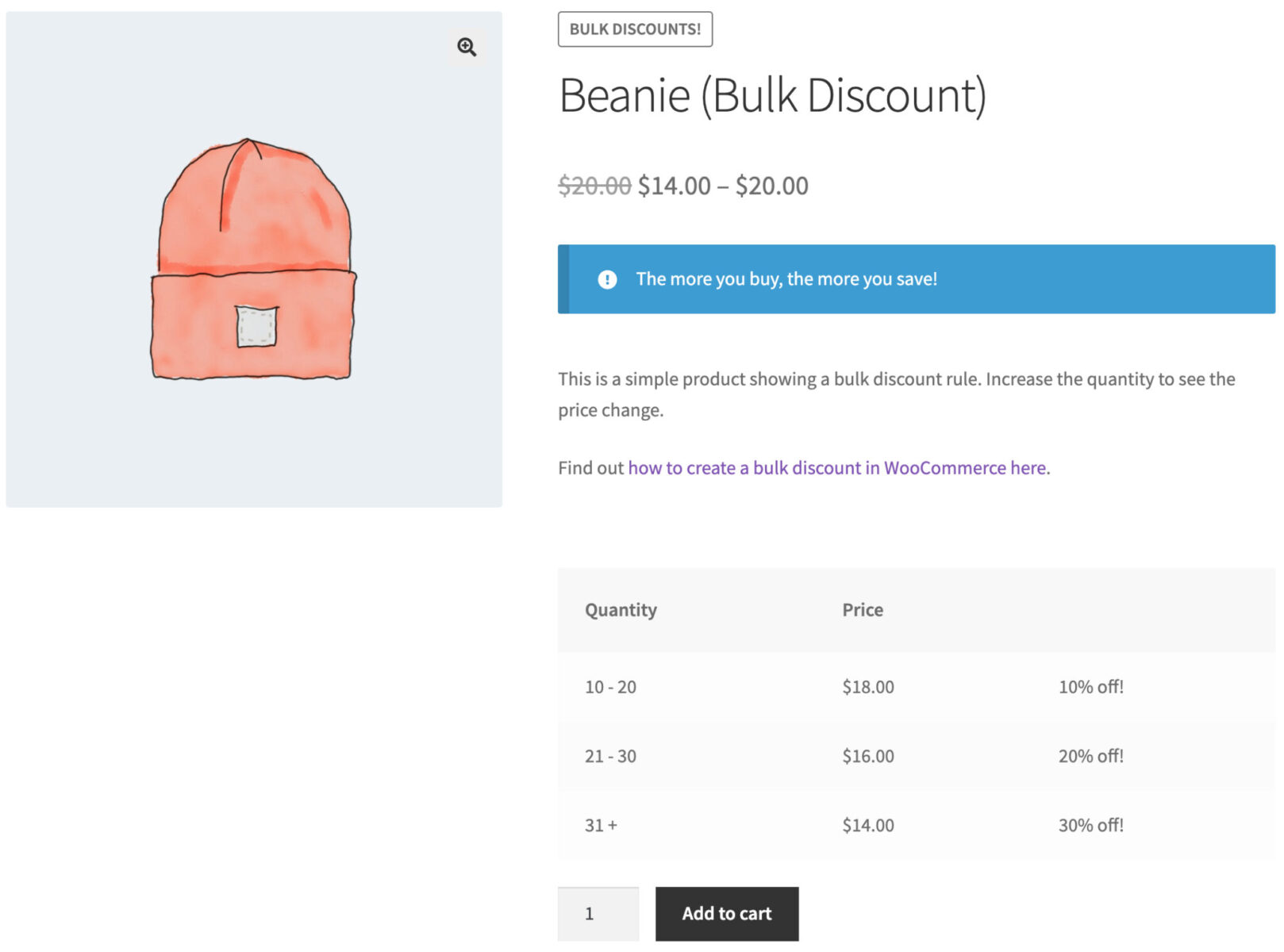
- Display pricing tiers in easy to read tables
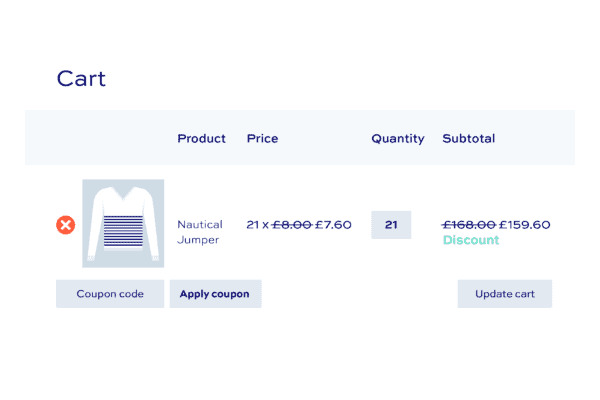
Advanced bulk and dynamic pricing rules
- Create storewide sales or set discounts per variation, product or category
- Schedule sales by start and end time and date
- Set pricing rules by user ID or user role
- Apply fees as well as discounts
- Set fees and discounts based on payment gateway
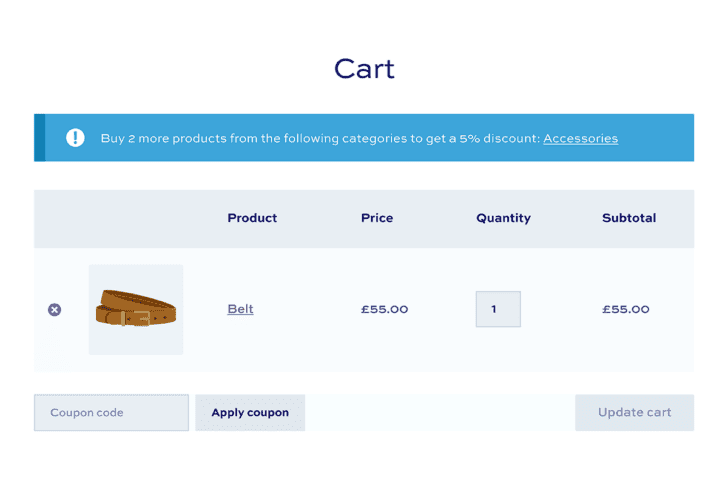
Unbeatable support and resources
- Personal support from our team
- Comprehensive documentation and videos
- Customizable and extendable
- 14 day money-back guarantee
WooCommerce Dynamic Pricing and Discount Rules plugin customer reviews
See more reviews View us on Trustpilot
WooCommerce Dynamic Pricing and Discount Rules plugin features
The most advanced WooCommerce discount rules plugin available




Fixed or percentage discounts
Apply discounts as percentages or fixed amounts
Conditional discounts
Create different discounts for different users and scenarios
Discount by user role
Set different discounts for different user roles
Discount by product, category or globally
Create multiple rules and apply them to different products
Customer specific discounts
Apples discounts based on email address, email domain, or user ID
Promote your discounts
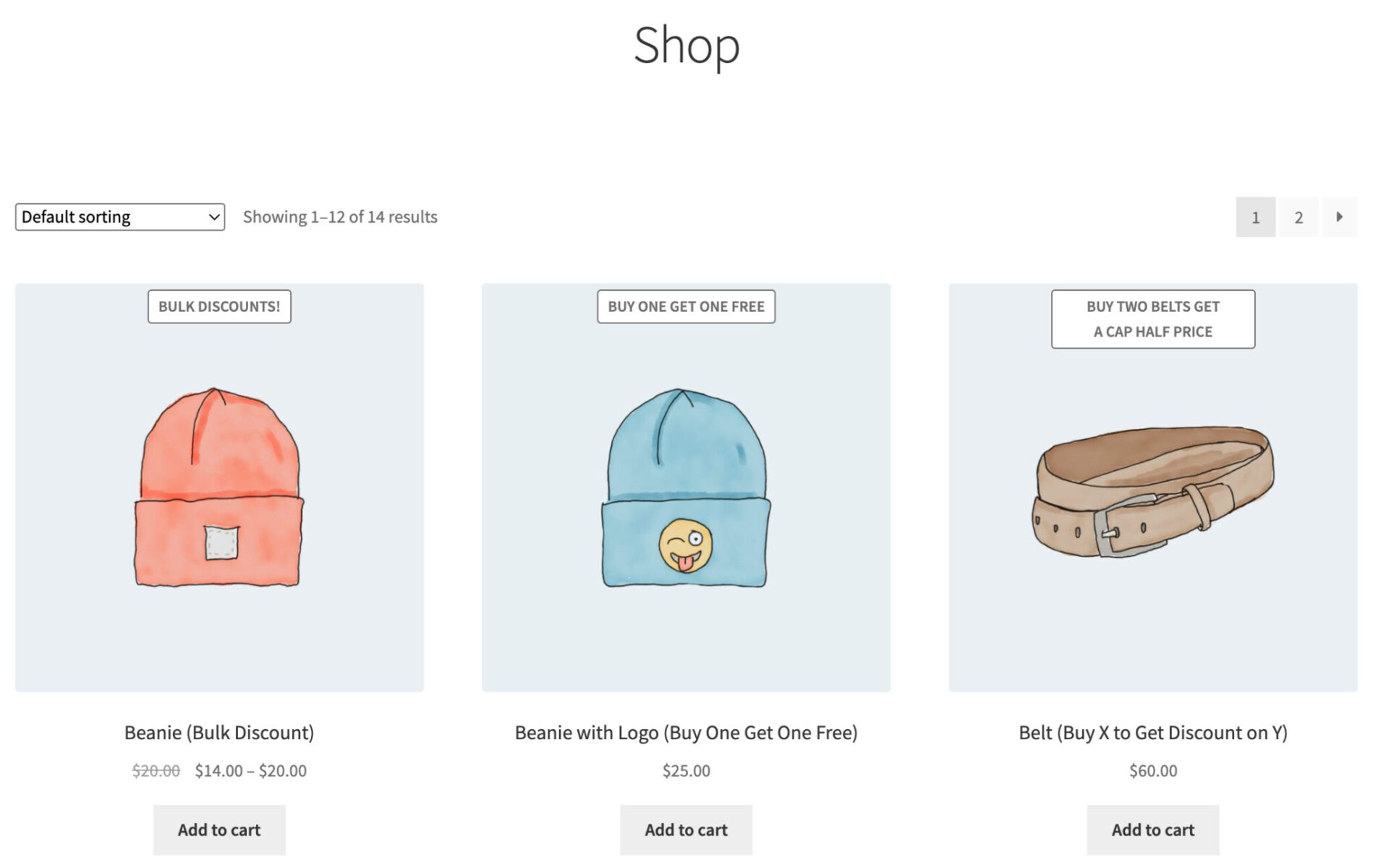
Create dynamic front-end notices, messages and sales badges
Format pricing labels
Show discounts next to original price with strikethrough
Add extra fees
Optionally apply extra charges instead of discounts
Payment gateways
Set discounts or surcharges depending on payment gateway
Set product prices based on COGS
Create rules to easily mark up some or all of your products based on their cost of goods value
Simple discounts
Apply fixed or percentage discounts to some or all products
BOGO offers
Buy one (or more) products and get one (or more) of the same product free or discounted
Buy X Get Y
Buy one (or more) specific products and get one (or more) different products free or discounted
Bulk discounts
Offer a range of different percentage or fixed price discounts based on the quantity of items purchased
Tiered pricing
Set different fixed prices for users based on the quantity of items they're purchasing
Discount on spend
Apply discounts based on the amount spent on specific products or categories
Discount on cart total
Apply discounts based on the overall value of the cart
Bundle discounts
Buy X products for a specific amount
Discounts on order history
Apply different discounts based on what items the customer has purchased previously
Spend X Get Y
Offer free or discounted gifts when the customer spends a certain value
Buy X Get X offers
Buy a product and get more of the same product free or discounted
Buy X Get Y offers
Buy a product and get a different product free or discounted
Free gifts
Offer free gifts - and automatically add them to the cart
Bulk pricing discounts
Create discounts tiers - e.g. buy 5 to 10 items for 10% off, buy 10 to 20 items for 20% off, etc
Show discount table on product pages
Display discount levels per quantity in tables on the product page
Tiered pricing
Set fixed price tiers - e.g. buy 5 to 10 items for $20 each, buy 10 to 20 items for $18 each, etc

Product, category, taxonomy discounts
Dynamic pricing rules by product, category, taxonomy, brand, attribute or globally



Discounts for individual products
Create dynamic pricing per product
Variation-level discounts
Set different discounts for different variations
Category discounts
Set dynamic pricing on products in one or more categories
Taxonomy discounts
Apply discounts to products by taxonomy or tag
Attribute discounts
Create discounts for products with specific attributes
Brand discounts
Create dynamic discounts for products in specified brands
Seasonal sales
Run sales for Black Friday or Christmas - or any time of year
Automatic discounts
Set up the discount and wait for it to kick in
Schedule sales
Create time-based sales: define start and stop dates and times
Discount by order total
E.g. spend $500 and get a 20% discount
Buy X items for Y
Create offers like 'Buy 3 hoodies for $100'
Spend X and Get Y
Create offers like 'Spend $250 and get a free gift'
Percentage or fixed
Apply discounts by percentage or a fixed amount
Discounts by product / category
E.g. spend $250 on products in Category A for 10% off
Create spending tiers
Offer bigger discounts for bigger order amounts
Works with all discount rules
Create any kind of discount and apply for specific user roles
Exclude user roles
Create discounts for everyone - except certain users
Wholesale and B2B
Perfect for stores offering discounts to certain user groups
Customer-specific discounts
Create discount rules for individual customers
Discount rules by email domain
Create discounts for all users using specific email domains


Go further with dynamic pricing
Dynamic Prices and Discount Rules works brilliantly with other plugins
Discount for first order
Apply discounts only for users placing their first order on your store
Discount based on last order value
Apply Dynamic pricing based on the value of user's most recent order
Discount based on last order quantity
Apply discounts based on number of items purchased in user’s most recent order
Discount based on number of orders
Apply discounts depending on the total number of users' previous orders
Discount on value of previous orders
Apply discounts depending on the total value of users' previous orders
Order history since date
Apply purchase history discounts from specific dates
Themes and page builders
WooCommerce Dynamic Prices and Discount Rules works with all themes and page builders
Multilingual discounts plugin
Dynamic Prices and Discount Rules is compatible with multilingual plugins and ships with complete translations for French, German, Italian, Portuguese, Portuguese (Brazilian) and Spanish
Multi currency discounts plugin
Dynamic Prices and Discount Rules supports multi currency
WooCommerce Members Only
Dynamic Prices and Discount Rules is fully compatible with our WooCommerce Members Only membership plugin
WooCommerce Product Add-Ons Ultimate
Dynamic Prices and Discount Rules is fully compatible with our WooCommerce Product Add-Ons Ultimate plugin
Pricing
All purchases are covered by a 14 day money back guarantee.
All prices are in US Dollars.
Yearly licenses renew annually - cancel anytime
Lifetime licenses are a one-time payment
Single
$69 + VAT *
Use on a single siteUse this plugin on one production site
Renews annuallyThis plugin will automatically renew every year. If you cancel it, you can continue to use the plugin but will not receive support or updates
14 day money back guaranteeIf the plugin isn't what you want, just drop us a line within 14 days for a full refund
Pro
$99 + VAT *
Use on up to 5 sitesUse this plugin on up to 5 sites
Renews annuallyThis plugin will automatically renew every year. If you cancel it, you can continue to use the plugin but will not receive support or updates
14 day money back guaranteeIf the plugin isn't what you want, just drop us a line within 14 days for a full refund
Free set-upDrop us an email after your purchase with the details of a product you'd like to set up and we'll do it for you - free of charge
Agency
$349 + VAT *
Use on up to 25 sitesUse this plugin on up to 25 sites
Renews annuallyThis plugin will automatically renew every year. If you cancel it, you can continue to use the plugin but will not receive support or updates
14 day money back guaranteeIf the plugin isn't what you want, just drop us a line within 14 days for a full refund
Free set-upDrop us an email after your purchase with the details of a product you'd like to set up and we'll do it for you - free of charge
Single
$189 + VAT *
Use on a single siteUse this plugin on one production site
One-time paymentThis is a single one-time charge. You'll receive support and updates for the lifetime of the product
14 day money back guaranteeIf the plugin isn't what you want, just drop us a line within 14 days for a full refund
Pro
$279 + VAT *
Use on up to 5 sitesUse this plugin on up to 5 sites
One-time paymentThis is a single one-time charge. You'll receive support and updates for the lifetime of the product
14 day money back guaranteeIf the plugin isn't what you want, just drop us a line within 14 days for a full refund
Free set-upDrop us an email after your purchase with the details of a product you'd like to set up and we'll do it for you - free of charge
Agency
$899 + VAT *
Use on up to 25 sitesUse this plugin on up to 25 sites
One-time paymentThis is a single one-time charge. You'll receive support and updates for the lifetime of the product
14 day money back guaranteeIf the plugin isn't what you want, just drop us a line within 14 days for a full refund
Free set-upDrop us an email after your purchase with the details of a product you'd like to set up and we'll do it for you - free of charge

A full refund if you're not happy
I built this plugin myself and my team and I are available to support you personally. We want you to be 100% satisfied with your purchase so if, for any reason, this plugin doesn't meet your expectations over the next 14 days, let us know and we'll give you a full refund.
Why buy the WooCommerce Dynamic Pricing and Discount Rules plugin?
By installing the WooCommerce Dynamic Pricing and Discount Rules plugin, you have complete control over your product pricing and can implement complex strategies that will encourage and incentivize customers to spend more in your WooCommerce store.
FAQs
What discount rules are available?
You can apply the following types of discount by product, category or storewide:
- Simple: apply a simple percentage or fixed discount (or fee) to some or all products in your store
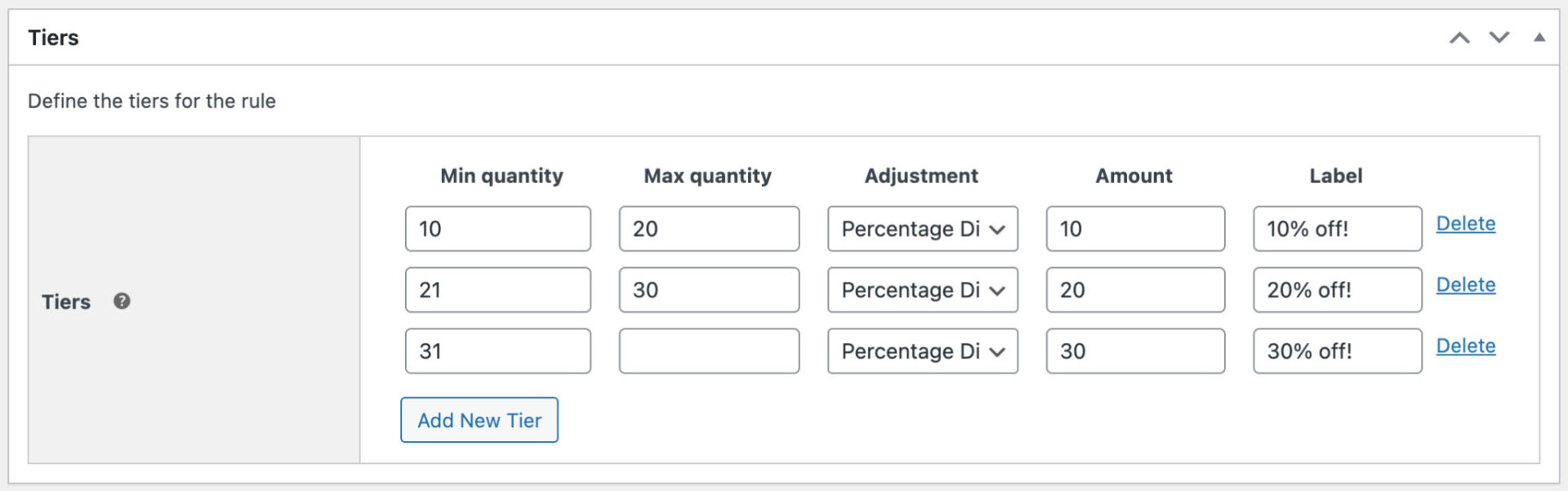
- Bulk discounts: create quantity-based discounts. For example, apply a 10% discount when the user purchases 10 items, a 20% discount when they purchase 20 items, and so on
- Tiered pricing: set different prices for products based on how many items the user purchases. For example, set the product price to $15 when the user purchases 10 or more items, $12 when they purchase 20 or more, and so on
- BOGOF: with Buy One Get One Free offers, users can purchase an item and get another item free. You can vary this in any way you like - e.g. Buy Two and Get One Half Price
- BXGY: create rules like 'Buy Two Polos and Get a Free Tee' or any variation
- Spend X Get Y: spend a certain value and get a discount on certain products, like 'Spend $150 and get $25 off'
- Buy X for Y Amount: also called 'bundle discounts' - buy a certain number of items for a fixed price, e.g. 3 hoodies for $50
- Discount on spend: apply discounts based on the value of certain products in the cart
- Discount on cart total: apply discounts based on the overall cart total
- Discount on purchase history: apply discounts based on the number value of orders a user has previously made, e.g. discount for a user's first order, discount for users who have spent over a certain amount
Additionally, you can apply fees or discounts to specific payment gateways, if you wish.
Can I display discounts on the front end?
Yes, the Dynamic Pricing and Discount Rules plugin has several options for you to display discounts on the front end.
- Price formatting options allow you to choose how to display discounted prices. For instance, you can simply display the original price with a strikethrough and the discounted price next to it. Or you can add text, e.g. 'Was $25, Now $20'.
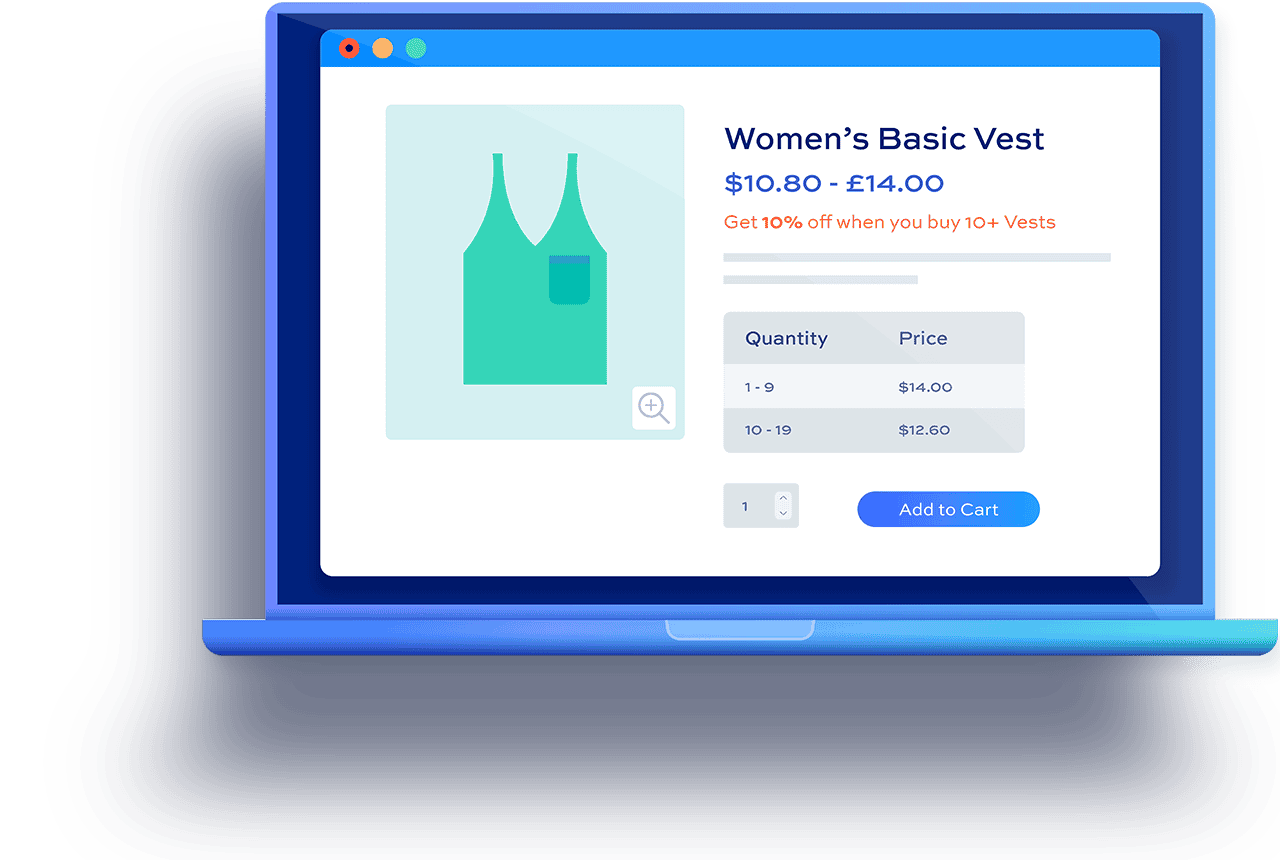
- Pricing tables for bulk and tiered discounted products clearly show how much a product costs for each quantity tier. This will dynamically highlight the current tier as the user updates quantity. It will also dynamically update the main price label depending on the quantity selected.
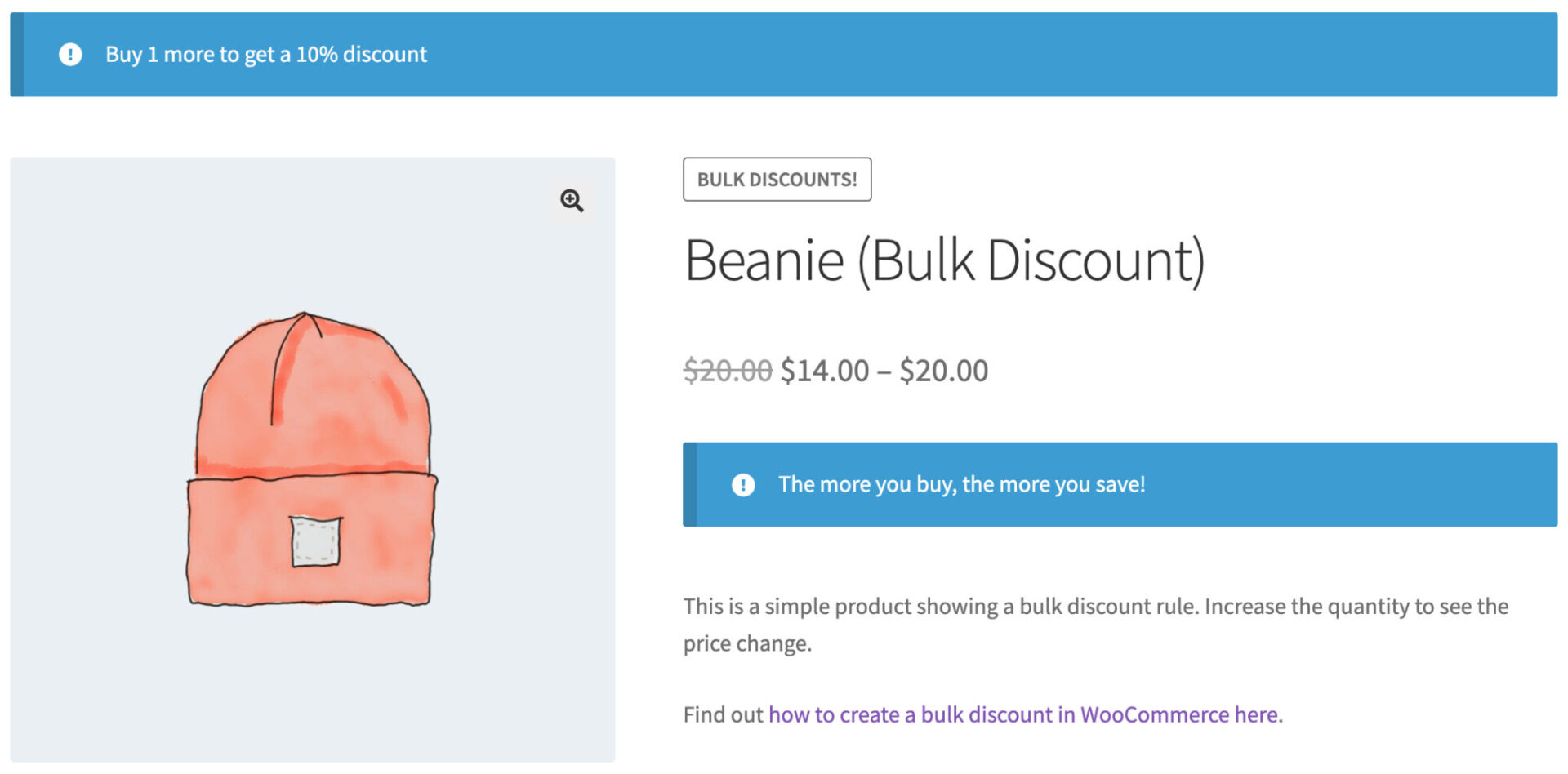
- Custom messaging on each product page allows you to add clear notices informing the customer of available discounts for that product
- Upsell notices based on the contents of the cart incentivize users to buy more - e.g. 'Buy 3 more hoodies to qualify for a 20% discount'
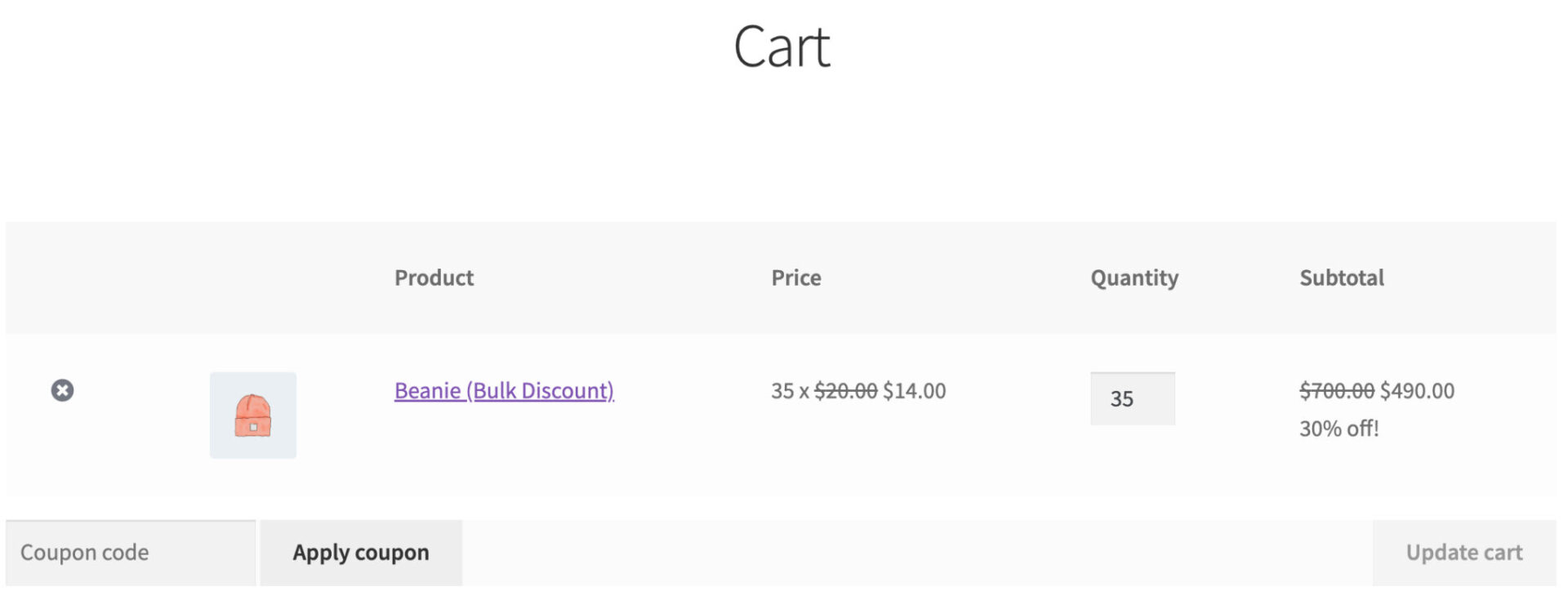
- Strikethroughs and labelling on the cart page allow the customer to see exactly what they're saving
Can I apply discounts only to certain categories, products or variations?
Yes, you can choose to apply discounts globally across your store, to specific categories, or to individual products, or even to specific variations - allowing for highly targeted promotions or storewide sales.
If you're apply category discounts, you can choose whether to include or exclude sub-categories.
How do I create a simple percentage discount in WooCommerce?
The Dynamic Pricing and Discount Rules plugin makes it easier to add simple percentage discounts to multiple products in WooCommerce:
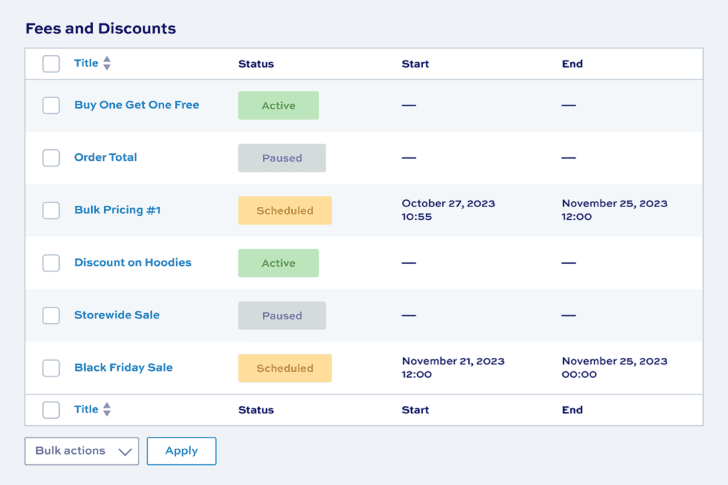
- Create a new discount rule from WooCommerce > Fees and Discounts
- Choose 'Simple' as the rule type
- Select which products the discount should apply to - either all products, certain categories, or specific products
- Enter the value of the discount, e.g. 20%
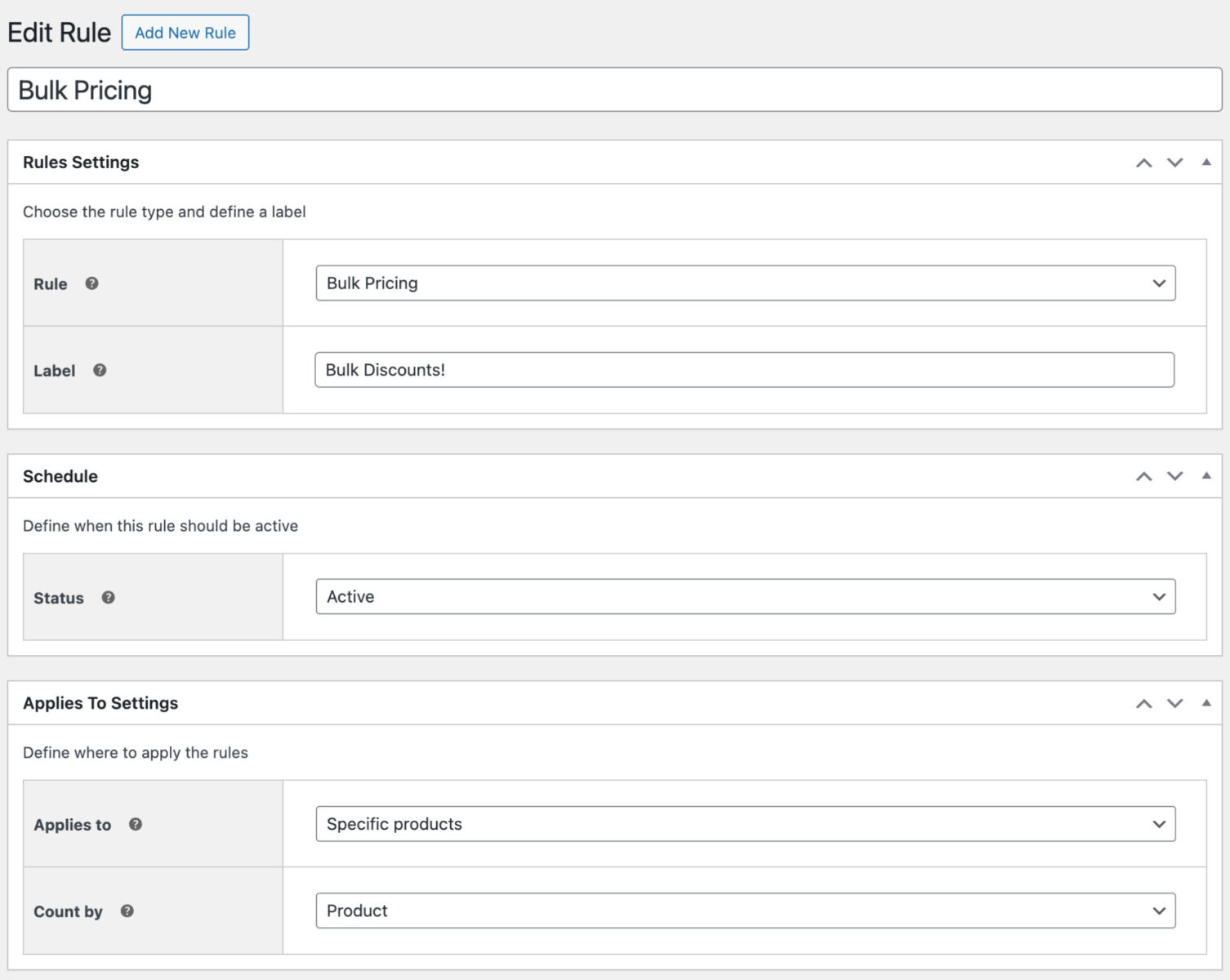
How do I create bulk pricing rules?
In Dynamic Pricing and Discount Rules, you can easily create bulk pricing rules to offer discounts based on the quantity of products purchased by the customer.
You could offer a simple discount like this:
- Buy 10 or more and get a 5% discount
Or you can layer it to create more and more attractive discounts depending on the quantities:
- Buy 10 or more and get a 5% discount
- Buy 20 or more and get a 10% discount
- Buy 50 or more and get a 20% discount
Our plugin makes it easy to create bulk pricing rules:
- Create as many pricing tiers as you like
- Apply bulk discounts to specific products, products in specified categories, or all products
- Create different bulk pricing rules for different products
Display pricing tiers in a table
Dynamic Pricing and Discount Rules also lets you display a product's pricing tiers in an easy to read table - so your customers can see exactly what they'd pay depending on the quantity of product they select.
How I create BOGO rules?
WooCommerce Dynamic Pricing and Discount Rules allows you to create discounts and fees for products based on simple rules that you set up. For example, 'Buy One Get One Free' or 'Buy Two of X and Get 1 of Y Half Price'.
Offers can apply to:
- All items in the cart
- Specific products
- Products in specific categories
Furthermore, you can specify how many products the customer needs to purchase in order to qualify for the offer, and you can specify how many products they receive at the adjusted rate. You can also specify how the discount (or additional fee) is calculated, either a fixed fee or a percentage.
So you can do all kinds of deals, e.g.:
- Buy one get one free
- Buy two get one free
- Buy three get two half price
- Buy four get one at 10% off
And so on. There's no limit to how you want to structure the pricing rules.
You can also specify that the customer needs to buy items from a certain group of products in order to receive items from a second group of products. This means you can do promotions like:
- Buy two laptops and get a free printer
- Buy three cushions and get a rug half price
- Buy three t-shirts and get the next one at 10% off
You can also add extra text to product pricing labels on the front end to advertise your promotions.
Rules are simple to set up. They take a matter of seconds to create.
Can I automatically free gifts to the cart?
Yes, you can use the 'Buy X Get X' or 'Spend X Get Y' rule types to create 'Buy One Get One Free' style offers. If you wish, you can set these so that the free or discounted item(s) will be automatically added to the cart when the user purchases the required number of items or spends the right amount.
How do I create a sitewide sale in WooCommerce?
You can create sales that apply to your whole WooCommerce store easily with the Dynamic Pricing and Discount Rules plugin. Simply create a new discount rule and define what discount you're offering (e.g. 20% off everything).
You can also define start and end dates for the special offer, choose what users to include or exclude, and what products are discounted.
Can I offer discounts for specific users or user roles?
Yes, WooCommerce Dynamic Pricing and Discount Rules is a user role pricing plugin. It allows you to sell your products at different prices for specific customers or specific user roles.
- Apply discounts for one or more specific users - great for customer-specific pricing
- Apply discounts for one or more user roles - so you can target certain customers (e.g. wholesale)
- Exclude specific users or user roles from discounts - so you can create a discount for all users, except wholesale
You can apply all kinds of discount by user role or user ID:
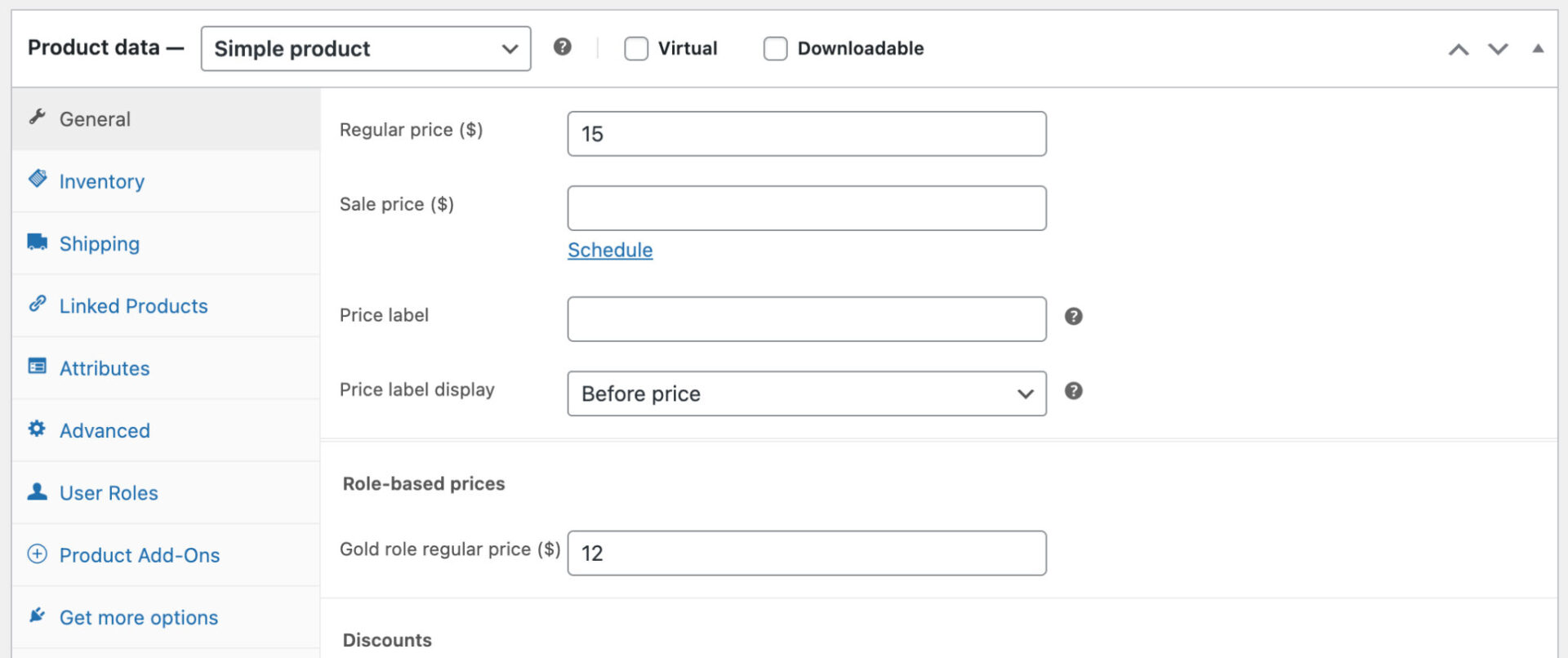
- Set discounts or premiums for each user / user role globally, by individual product, or by variation
- Set discounts or premiums as a fixed amount or a percentage
- Create bulk pricing rules, tiered pricing, BOGOF, etc for specific users and user roles
- Exclude tax for specific user roles
Can I apply fees or discounts for different payment gateways?
Using Dynamic Pricing and Discount Rules, you can also incentivize customers to choose certain payment gateways or levy additional charges on other gateways.
Each payment gateway has its own settings, applied independently, including:
- Set a label to appear in the cart totals
- Choose whether to apply a fee or a discount
- Choose between a flat rate, fixed fee/discount or a percentage of the cart total
- Choose whether to include shipping costs as part of the cart total
- Specify a minimum cart total for the fee/discount to apply
- Specify a maximum cart total for the fee/discount to apply
- Specify a minimum fee/discount value (this is useful when your fee/discount is a percentage of the cart total, so you can set a minimum level for the fee or discount)
- Specify a maximum fee/discount value (also useful when your fee/discount is a percentage of the cart total, so you can limit the overall fee or discount)
- Select whether to apply tax to the fee
- Select which tax class to use
Can I run multiple discount rules at the same time?
Yes, you can create multiple discount rules based on different conditions, and they can run simultaneously. This allows you to have, for example, a quantity discount for one product and a role-based discount for another.
Can customers see how much they save?
Yes, you have a number of options for how to display the discount on product and shop pages - e.g. with a strikethrough over the original price or with additional text.
The cart page also displays the original price crossed out with the discounted price next to it.
What plugin do I need to create wholesale discounts?
The WooCommerce Dynamic Pricing and Discount Rules plugin allows you to create different discounts for your wholesale customers. Its role-based pricing features are ideally suited for wholesale and B2B customers.
For even greater functionality for your wholesale store, Dynamic Pricing and Discount Rules is also available as part of our WooCommerce Wholesale & B2B Plugin Bundle. This includes two further plugins - Members Only and Product Table Ultimate - which allow you to restrict access to products, control who sees pricing, and display products in easy-to-use tables.
How do I stop discounts from overlapping or conflicting?
You can set priorities on rules, ensuring that customers receive the correct discount based on the conditions you set.
Can I schedule discounts for specific dates?
Yes, you can set start and end times and dates for each discount rule. The rules will start and stop automatically depending on the times you've set. It's perfect for Black Friday, flash sales, or any sale that you want to plan ahead for.
How do I handle tax exemptions for specific user groups?
The plugin lets you exclude taxes for certain user roles, such as B2B and wholesale customers. You can define which roles are exempt, simplifying tax-free purchasing for eligible users.
Try our plugins risk free with our 14 day money back guarantee.
Our products are featured on

Screenshots
See how the plugin looks on the back and front ends.